
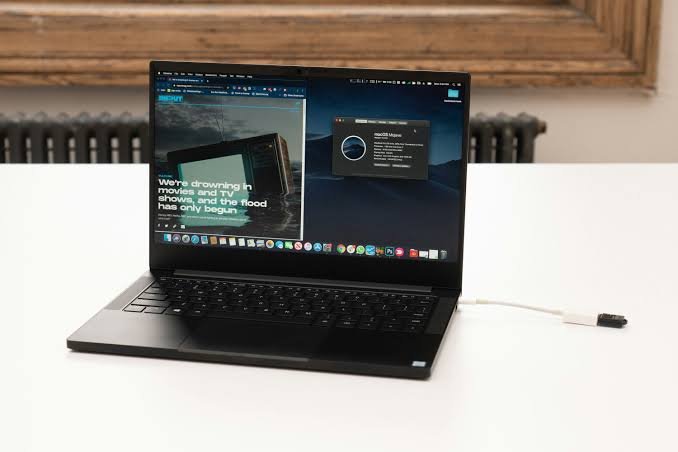
The Hackintosh Razer Blade Stealth has been a popular topic among developers, programmers, and technology enthusiasts who want to experience macOS wi
The Hackintosh Razer Blade Stealth has been a popular topic among developers, programmers, and technology enthusiasts who want to experience macOS without purchasing an Apple computer. Thanks to its premium build quality, compact design, and Intel hardware found in older models, the Razer Blade Stealth has become one of the most commonly discussed Windows ultrabooks for Hackintosh projects.
While installing macOS on a Razer Blade Stealth is possible on certain models, it requires careful planning, compatible hardware, and a good understanding of the Hackintosh process. Unlike a genuine Mac, every component in the laptop must be checked for compatibility, and additional configuration is often necessary to ensure features like audio, Wi-Fi, sleep mode, and graphics work properly.
In this guide, you’ll learn what a Hackintosh is, which Razer Blade Stealth models offer the best compatibility, how the installation process works, the common challenges users face, and whether building a Hackintosh is still worthwhile today.
What Is a Hackintosh?
A Hackintosh is a standard PC or laptop that has been configured to run macOS instead of Windows or Linux. Since Apple designs macOS to work only on its own hardware, installing the operating system on a non-Apple computer requires additional tools and custom configuration. Most modern Hackintosh systems use the OpenCore bootloader, which helps the computer boot macOS by mimicking supported Apple hardware.
Many developers and technology enthusiasts build Hackintosh systems because they need access to macOS for software development, application testing, or simply because they enjoy experimenting with different operating systems. Although a successful Hackintosh can provide an experience that feels similar to using a Mac, it requires ongoing maintenance and troubleshooting whenever new macOS updates are released.
Why the Razer Blade Stealth Is Popular for Hackintosh
The Razer Blade Stealth has earned a strong reputation within the Hackintosh community because several of its earlier Intel-based models share hardware components that closely resemble those used in Intel-powered Macs. This similarity makes compatibility much better than many other Windows laptops.
In addition to its hardware, the laptop offers premium aluminum construction, a sharp display, fast SSD storage, and a compact design that appeals to professionals who need a portable workstation. Many developers appreciate having macOS available on hardware that also performs well when running Windows or Linux, making the Razer Blade Stealth a flexible choice for dual-boot setups.
However, not every version of the laptop provides the same experience. Hardware changes between different generations can significantly affect compatibility.
Which Razer Blade Stealth Models Are Compatible?
Intel 8th Generation Models
The Intel 8th Generation Razer Blade Stealth models are generally considered the best choice for a Hackintosh project. These laptops use Intel UHD Graphics, which are well supported by macOS and require fewer adjustments during installation. Because many users have already built successful Hackintosh systems on these models, there is plenty of community documentation available to help troubleshoot common problems.
With proper configuration, users can often achieve working graphics acceleration, keyboard functionality, trackpad support, audio, and acceptable battery performance.
Intel 10th Generation Models
Intel 10th Generation versions are also capable of running macOS, although the installation process is usually more involved. Additional configuration may be required for USB mapping, power management, and sleep functionality. Some wireless adapters included with these laptops may also require replacement because they are not fully compatible with macOS.
Despite these challenges, many users report stable performance after carefully configuring the system using OpenCore.
Newer Models
Newer Razer Blade Stealth laptops are generally much more difficult to convert into a Hackintosh. Changes in graphics hardware, wireless chipsets, and firmware have reduced compatibility with modern versions of macOS. At the same time, Apple has transitioned entirely to Apple Silicon, meaning future versions of macOS are expected to provide less support for Intel-based systems.
For this reason, users interested in building a Hackintosh usually look for older Intel models instead of the latest hardware.
How to Install macOS on a Razer Blade Stealth
Installing macOS on a Razer Blade Stealth begins with identifying the exact laptop model and confirming that its hardware is compatible with the desired macOS version. Once compatibility has been verified, users typically create a bootable USB installer containing macOS and the OpenCore bootloader.
Before installation, several BIOS settings usually need to be adjusted to allow the system to boot correctly. After the installer loads, the storage drive is formatted using Apple’s APFS file system before macOS is installed.
The installation itself is only the first step. After macOS is running, users often spend additional time configuring drivers, mapping USB ports, enabling audio, adjusting power management, and ensuring the laptop enters and exits sleep mode correctly. A successful Hackintosh requires patience, careful research, and attention to detail throughout the process.
Hardware Compatibility
Hardware compatibility varies depending on the exact Razer Blade Stealth model. Older Intel processors generally perform very well because macOS includes native support for many Intel CPU features. Integrated Intel UHD Graphics are also well supported, making them one of the biggest reasons older models remain popular among Hackintosh enthusiasts.
Other components may require additional work. Audio often functions after installing the correct configuration files, while the keyboard and trackpad usually work with proper setup. Wi-Fi and Bluetooth compatibility depend heavily on the wireless chipset installed in the laptop, and some users replace the factory wireless card with one that offers better macOS support. Features such as battery reporting, webcam functionality, and sleep mode can often be improved through OpenCore configuration and community-developed patches.
Common Challenges During Installation
Even experienced users encounter problems when building a Hackintosh. Boot loops, kernel panics, and installation errors are among the most common issues during the initial setup. These problems usually result from incorrect BIOS settings, incompatible drivers, or an improperly configured EFI folder.
After installation, users may notice that some hardware features do not work immediately. USB ports may need manual mapping, Wi-Fi might not function with the original wireless card, and sleep mode can require additional tuning before it becomes reliable. Fortunately, many of these issues have already been documented by the Hackintosh community, making it easier to find tested solutions for specific laptop models.
Is a Hackintosh Razer Blade Stealth Worth It in 2026?
Whether building a Hackintosh is worthwhile depends largely on your goals. If you already own a compatible Intel-based Razer Blade Stealth and enjoy learning about computer hardware and operating systems, creating a Hackintosh can be a rewarding project. It can also provide access to macOS for software development, programming, and testing without purchasing older Apple hardware.
On the other hand, Apple’s move to Apple Silicon has changed the future of Hackintosh systems. As Intel support gradually declines, newer versions of macOS may become increasingly difficult to run on non-Apple hardware. Anyone starting a Hackintosh project today should understand that long-term software support is uncertain and future updates may require additional work or may not be compatible at all.
Conclusion
The Hackintosh Razer Blade Stealth remains an interesting option for technology enthusiasts who want to experience macOS on premium Windows hardware. Older Intel-based models continue to offer the best compatibility thanks to their supported processors and integrated graphics, while newer models present greater installation challenges due to changing hardware and Apple’s transition to Apple Silicon.
Although building a Hackintosh requires patience, technical knowledge, and ongoing maintenance, many users still find the project worthwhile for development, experimentation, and learning. By choosing a compatible model and following reliable community resources, you can greatly improve your chances of creating a stable and enjoyable macOS experience.
FAQs
Is it possible to install macOS on a Razer Blade Stealth?
Yes, several Intel-based Razer Blade Stealth models can run macOS using OpenCore, provided the hardware is compatible and the system is properly configured.
Which Razer Blade Stealth model is best for Hackintosh?
Most users recommend Intel 8th Generation and Intel 10th Generation models because they offer the best balance of hardware compatibility and community support.
Does every hardware feature work after installing macOS?
Not always. While many features can be made to work, components such as Wi-Fi, Bluetooth, audio, and sleep mode may require additional configuration or compatible replacement hardware.
Is a Hackintosh suitable for everyday use?
A properly configured Hackintosh can be stable enough for daily tasks such as programming, web browsing, office work, and content creation. However, users should expect occasional maintenance after macOS updates.
Is Hackintosh still worth building in 2026?
For users who enjoy experimenting with technology or need macOS on compatible Intel hardware, it can still be a worthwhile project. However, Apple’s continued focus on Apple Silicon means Hackintosh systems have a more limited future than they once did.
